The Engineering Plan Is in an Email. The Contract Is on the Server. The Photos Are on Jessica's Phone.
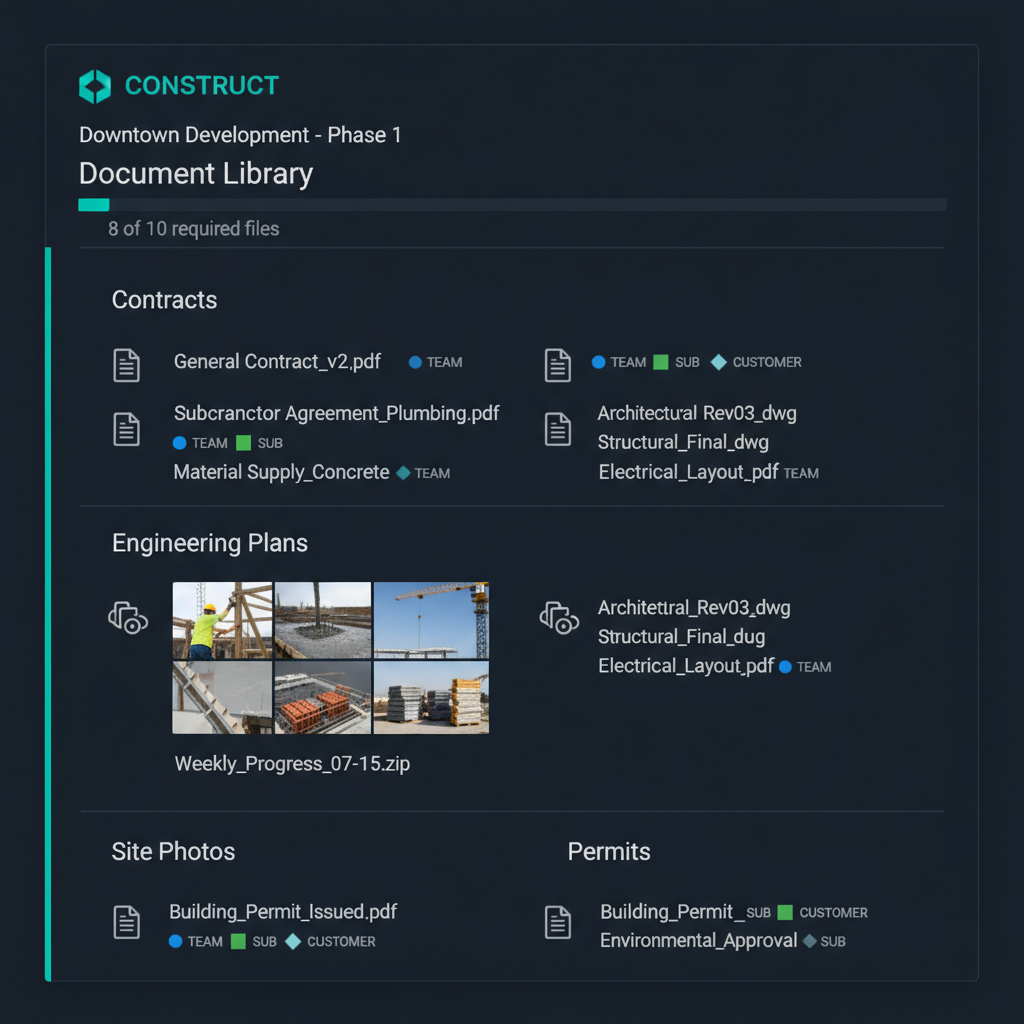
WFP stores every project document — surveys, contracts, 3D renderings, engineering plans, blueprints, sketches, photos — inside the project it belongs to. Configurable visibility controls who sees what. Required file enforcement ensures every project has a complete paper trail. The result is an audit-ready archive accessible in seconds.
It's 4:30 PM. An Insurance Adjuster Needs Project Documentation by Tomorrow Morning.
Marcus gets a call at 4:30 PM from his insurance company. There was an incident on the Cypress Point project eight months ago — a sub's equipment damaged a neighbor's fence. The insurance adjuster needs the project documentation: the original contract, the sub's COI at the time of the incident, the work order that assigned the sub, and photos from the site that week. He needs it by 9 AM tomorrow.
Marcus calls Jessica. The Cypress Point project finished five months ago. Jessica's files for it are in at least four places: the contract is scanned and somewhere on the office server (she thinks in the Q2 folder, or maybe Q1), the sub's COI was emailed from the sub's office manager six months before that (she would need to search her inbox), the work order was sent via text, and the site photos are on her old phone — she upgraded two months ago.
Jessica spends the evening searching. By 10 PM she has found the contract (it was in Q1, misfiled) and the COI (in her deleted emails, recovered). The work order text is gone — she switched phones. The photos exist on a cloud backup, but she cannot identify which ones are from the right week.
Every construction company accumulates thousands of documents. The question is whether you can produce the right ones when they matter.
The Solution
Every Document Inside the Project It Belongs To — Accessible, Organized, Complete
WFP's file management is not cloud storage with a construction label. It is project-centric, role-aware, and completeness-enforced — creating an audit-ready archive as a natural byproduct of daily operations.
Every File Lives Inside Its Project
WFP stores every document — surveys, contracts, 3D renderings, engineering plans, blueprints, sketches, site photos, permits, and any other file — inside the project it belongs to. When Jessica needs the engineering plan for the Meadowbrook project, she opens the Meadowbrook project and the file is there. No email searching, no drive browsing, no wondering which folder it is in. The project is the filing system.
Control Who Sees What — Team, Subs, Customers
Not every document is for every audience. WFP's configurable visibility settings let you control which files are visible to internal team members, which are shared with subcontractors through their portal, and which are accessible to customers through the customer portal. The homeowner sees their contract and progress photos. The sub sees the blueprints and specs for their scope. The PM sees everything. One project, multiple views.
Define What Every Project Must Have — Then Enforce It
WFP lets you configure required file types per project type — every pool project must have a signed contract, a survey, an engineering plan, and permit documentation. The system flags projects that are missing required files, so Jessica catches documentation gaps during the build — not eight months later when an adjuster calls. This enforcement turns file management from "optional when you remember" to "mandatory by design."
Contracts, Plans, Photos, Permits — Sorted and Searchable
Files within each project are organized by type and phase, making them instantly findable. All contracts together. All engineering plans together. All photos organized by date and phase. All permits linked to the project's permitting data. This organization means that producing documentation for any purpose — customer request, insurance claim, legal review, due diligence — takes seconds, not hours.
Every Project's Complete File History — Ready When You Need It
Because every file lives inside its project with required file enforcement, WFP creates an audit-ready archive by default. When Marcus needs to produce documentation for an insurance audit, a legal dispute, a compliance review, or a business sale due diligence process, every file for every project is organized, complete, and accessible within minutes. This is not an archive you build after the fact — it is an archive that builds itself as you work.
The Difference
What Cloud Storage and Shared Drives Cannot Do
Storage vs. Organization
Google Drive, Dropbox, and shared network folders give you storage. They do not give you project-centric organization. A folder called "Meadowbrook" works until you have 60 projects and nobody remembers which subfolder has the engineering plan versus the survey. WFP's per-project file storage is built into the project record — the file and the project are inherently connected, not manually filed.
No Enforced Completeness
No generic storage tool can tell you that the Cypress Point project is missing its signed contract and survey. WFP's required file enforcement flags incomplete project documentation as part of the project workflow — not as a separate audit you have to remember to run. Completeness is the default, not an aspiration.
Role-Based Visibility Built In
Sharing a Google Drive folder with a sub means they see everything in it — or you create separate folders and manage access manually. WFP's configurable visibility is per-file and per-audience: subs see their scope documents, customers see their project files, and internal team members see everything. The access model is built into the file management system, not bolted on through sharing settings.
When Every File Is Organized and Complete, the Business Becomes Sellable
A construction company managing 60+ simultaneous pool projects was successfully sold — and one of the factors that enabled a clean due diligence process was the complete, organized archive of every project's documentation. Contracts, permits, engineering plans, photos, sub agreements, warranty records — all accessible per project, all complete, all retrievable in minutes. When a buyer's due diligence team can find any document for any project instantly, the business demonstrates the operational maturity that commands premium valuation.
Most construction companies organize files in shared drives, email folders, or physical filing cabinets — sorted by project name or date. This works until you have 30+ active projects and need to find a specific document from a project that finished six months ago. WFP organizes files per project inside the project record, with type-based categorization and searchability.
Any file type — surveys, signed contracts, 3D renderings, engineering plans, blueprints, sketches, site photos, permit documents, sub agreements, warranty documentation, change orders, and anything else relevant to the project. There are no file type restrictions. Every file is stored inside the project it belongs to.
Yes. Through configurable visibility settings, you control which files subcontractors can access through their portal. A tile sub sees the blueprints and specs for their scope. They do not see the contract, financial documents, or files outside their assignment. Visibility is per-file, not per-folder.
Yes. Homeowners can access customer-visible files — typically their contract, progress photos, and project-related documents — through the WFP customer portal. You control what is visible. This eliminates the "can you send me my contract again?" call because the homeowner can find it themselves.
You can define which file types every project of a given type must have — for example, every pool project requires a signed contract, a site survey, an engineering plan, and permit documentation. WFP flags projects that are missing required files so you catch documentation gaps during the build, not months later when you need them.
When an insurance adjuster, attorney, or auditor needs project documentation, WFP's per-project archive produces every file for that project in seconds — contracts, permits, sub agreements, photos, work orders, and warranty records. Required file enforcement means the archive is complete, not just partial. The difference between producing organized documentation in minutes and scrambling for days can determine the outcome of a claim or dispute.
WFP is $2,500/month — one price, unlimited users, unlimited projects, all features including file management, configurable visibility, required file enforcement, and everything else. No storage limits on standard plans. See the full pricing breakdown at /pricing.
Explore More of the Platform
See how this feature connects to the rest of the platform.
See How WFP Keeps Every Document for Every Project Organized and Accessible
Get a personalized demo showing per-project file storage, configurable visibility, required file enforcement, and the audit-ready archive — tailored to the document types your company works with.
Schedule a DemoUnlimited users. Unlimited projects. One price.