A Permit Expired on One of Your Projects Last Month. You Found Out Today.
WFP's dedicated Permitting phase tracks every permit's application status, expiration countdown, and municipality-specific requirements across every active project. Inspections are tracked with pass/fail enforcement — projects cannot advance until required inspections pass. No spreadsheets. No sticky notes. No surprises from the inspector.
It's Thursday Afternoon. An Inspector Just Showed Up Unannounced.
Jessica is at a job site on the north side of town when her phone rings. It is the crew lead on the Sandpiper Lane project — an inspector just showed up for a plumbing inspection, but nobody scheduled it. Or rather, somebody requested it two weeks ago and forgot to tell Jessica. The inspection fails because the plumber has not finished the rough-in. Now the project is flagged and cannot move forward until the re-inspection is scheduled, which takes another ten days in this municipality.
Meanwhile, Marcus gets an email from the county on the Heron Bay project. The building permit was issued fourteen months ago. It expires in six weeks. If it expires before the final inspection, they will need to re-apply — new fees, new review period, potentially new code requirements that did not exist when the original permit was pulled. Marcus did not know this permit was at risk because the expiration date lives in a filing cabinet at the office.
Back at headquarters, three other projects have inspections due this week that nobody has confirmed. Jessica's spreadsheet says the permits are "active," but the spreadsheet was last updated on the 8th. Today is the 27th.
Every permit has an expiration date. Every inspection has a window. When you are managing 30 projects across five municipalities, the question is not if one slips — it is how many already have.
The Solution
Every Permit Tracked. Every Inspection Gated. Every Municipality Covered.
WFP does not treat permits as a checkbox and inspections as a task. It treats them as enforceable compliance gates built into the project lifecycle — because that is exactly what they are.
Permits Are Not a Task. They Are a Phase.
WFP's project lifecycle begins with a dedicated Permitting phase that tracks every permit required for the project — building, electrical, plumbing, structural, and any other municipality-specific requirements. Each permit has its own status: applied, issued, active, expiring, expired. Projects do not advance from Permitting to Staging until all required permits are in place. This is not a checklist — it is a gate.
Know Which Permits Expire Before the County Tells You
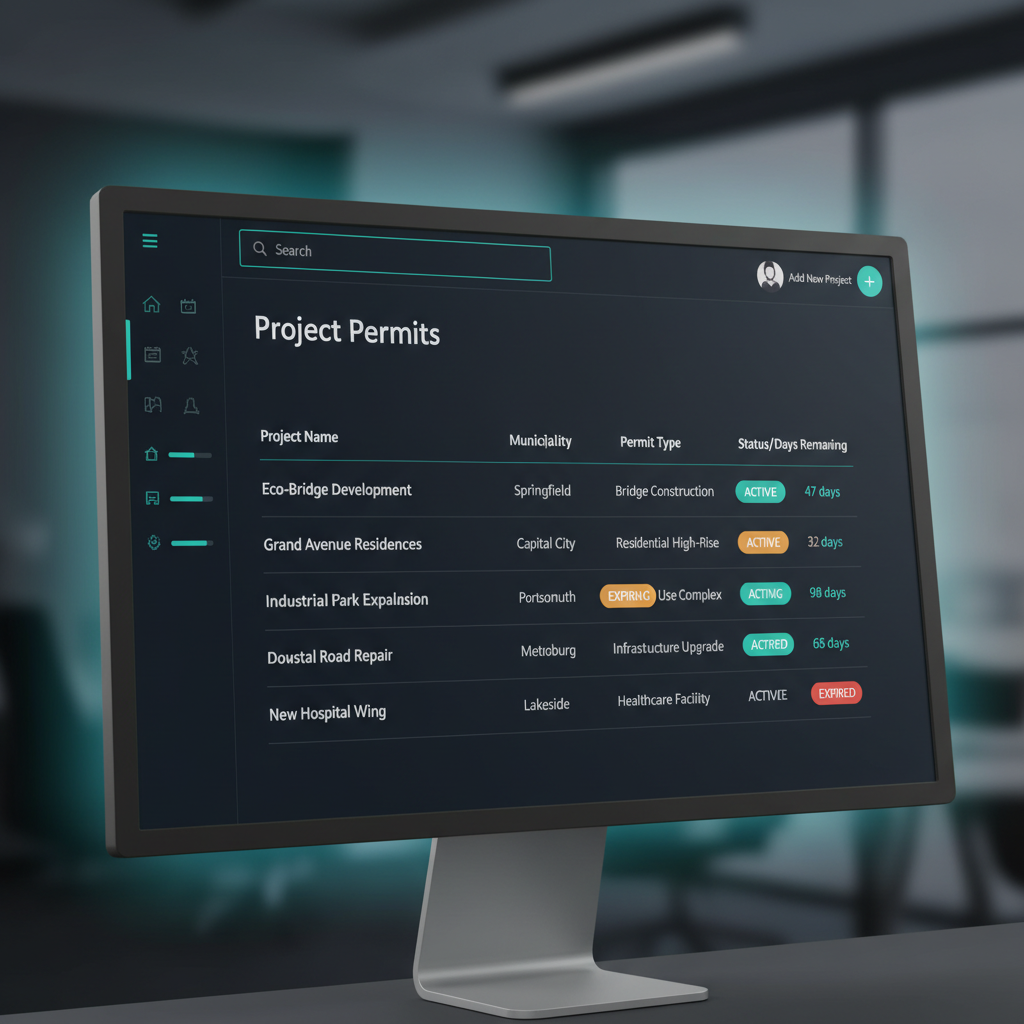
Every active permit displays a real-time expiration countdown visible from the project dashboard. As permits approach their expiration window, automated alerts surface them to the PM and the owner — weeks before the deadline, not days after. Color-coded status indicators (active, expiring, expired) make it impossible to overlook a permit at risk across any project in the system.
Inspections That Actually Gate Project Progress
Every required inspection is tracked with its scheduled date, result (pass/fail), and inspector notes. Failed inspections automatically block the project from advancing to the next phase until the issue is resolved and the re-inspection passes. This enforcement means PMs cannot accidentally push a project forward with an unresolved inspection failure — the system will not allow it.
Five Counties. Five Sets of Rules. One Dashboard.
Pool builders and general contractors often work across multiple municipalities simultaneously — each with different permit timelines, inspection requirements, and fee structures. WFP tracks municipality-specific permit types and inspection sequences per project, so a project in Hillsborough County follows different compliance steps than a project in Pinellas County, all managed from the same dashboard.
See Every Project's Path from Permit to Production
The permit tracking dashboard shows every project currently in the Permitting phase with its permit statuses, expected approval timelines, and any bottlenecks. Owners and PMs can see exactly which projects are waiting on permits, which are ready to move to Staging, and which have expiration risks. This pipeline visibility turns the pre-production bottleneck into a manageable, predictable queue.
The Difference
What Buildertrend, Spreadsheets, and Generic PM Tools Are Missing
Permit Expiration Countdown with Automated Alerts
Buildertrend and JobTread let you upload permit documents and mark tasks complete. Neither provides a real-time expiration countdown with automated alerts that surface permits at risk before the deadline. In most tools, a permit expiration is something you discover when the inspector arrives — by then, the project is already stopped.
Inspection-Gated Phase Transitions
In generic PM tools, an inspection is a checkbox. If it fails, someone has to remember to block the project manually. WFP's inspection pass/fail gates are structural — the system physically prevents a project from advancing to the next phase with an unresolved inspection failure. This is compliance enforcement at the software level, not compliance tracking at the task level.
Municipality-Specific Permit Sequences
Most construction software treats permits as a flat list — "building permit: done." WFP tracks municipality-specific permit types, sequences, and inspection requirements because the founder's company built across multiple Florida counties and learned that Hillsborough County requirements are nothing like Pasco County requirements. Your projects in different jurisdictions follow different compliance paths automatically.
Pre-Production Pipeline Intelligence
No competing tool shows you a pipeline view of projects waiting in the Permitting phase with estimated approval timelines and bottleneck identification. WFP's permit-to-production pipeline gives owners and PMs visibility into how many projects are stuck in pre-production and why — turning the permitting phase from a black hole into a manageable queue.
When Permits Stop Being a Bottleneck, Build Times Compress
A construction company managing 60+ simultaneous pool projects reduced average build times from 4-6 months to 8 weeks. One of the largest contributors was eliminating the pre-production bottleneck — permits tracked with expiration countdowns, inspections gated against phase transitions, and municipality-specific compliance automated across every project. When the permitting phase stops being a black hole where projects sit for unknown durations, the entire production timeline compresses.
The schedule planning, or at least plotting, allows us to be more efficient when it comes to planning the routes.
FAQ
Common Questions About Inspection & Permit Management in WFP
Can't find your answer? Ask us in a demo
WFP tracks municipality-specific permit types, sequences, and inspection requirements per project. Each project is tagged with its municipality, and the permit tracking follows the compliance path specific to that jurisdiction. Whether you build in one county or five, every permit is visible from one dashboard with expiration countdowns and status indicators.
If a building permit expires before the project's final inspection, you typically need to re-apply — which means new fees, a new review period, and potentially compliance with updated building codes that didn't exist when the original permit was pulled. This can delay a project by weeks or months. WFP's expiration countdown with automated alerts surfaces at-risk permits weeks before the deadline so you can take action — whether that means accelerating the project or requesting a permit extension.
Yes. WFP's inspection tracking uses pass/fail enforcement — a failed inspection blocks the project from advancing to the next phase until the issue is resolved and the re-inspection passes. This is not a manual flag that someone has to remember to set. It is a structural gate built into the project lifecycle.
A spreadsheet can list your permits. It cannot countdown to expiration dates automatically, send alerts when permits are at risk, enforce inspection pass/fail gates, or show you a real-time dashboard of permit status across all active projects. The spreadsheet is also only as current as the last time someone updated it — and in a 30-project operation, that gap between updates is where permits expire unnoticed.
Yes. WFP tracks any inspection type required for the project — building, electrical, plumbing, structural, mechanical, fire, final, and any other municipality-specific inspection. Each inspection has its own status (scheduled, passed, failed) and can include inspector notes and required follow-up actions.
Permitting is the first phase in WFP's project lifecycle. When all permits are issued and required initial inspections pass, the project automatically advances to Staging. Throughout the project, inspections at each phase (rough-in, tie-steel, pre-plaster, final) gate transitions to the next phase. This means permit and inspection compliance is woven into the project's forward motion — not managed as a separate administrative process.
WFP is $2,500/month — one price, unlimited users, unlimited projects, full access to every feature including permit tracking, inspection management, and everything else. No add-ons, no modules to unlock, no per-seat fees. See the full pricing breakdown at /pricing.
Explore More of the Platform
See how this feature connects to the rest of the platform.
See How WFP Tracks Every Permit and Inspection Across Your Entire Operation
Get a personalized demo showing permit expiration countdowns, inspection pass/fail gates, and multi-municipality compliance management — tailored to the jurisdictions your company works in.
Schedule a DemoUnlimited users. Unlimited projects. One price.