Your Subcontractor's Insurance Expired Three Weeks Ago. You Just Don't Know It Yet.
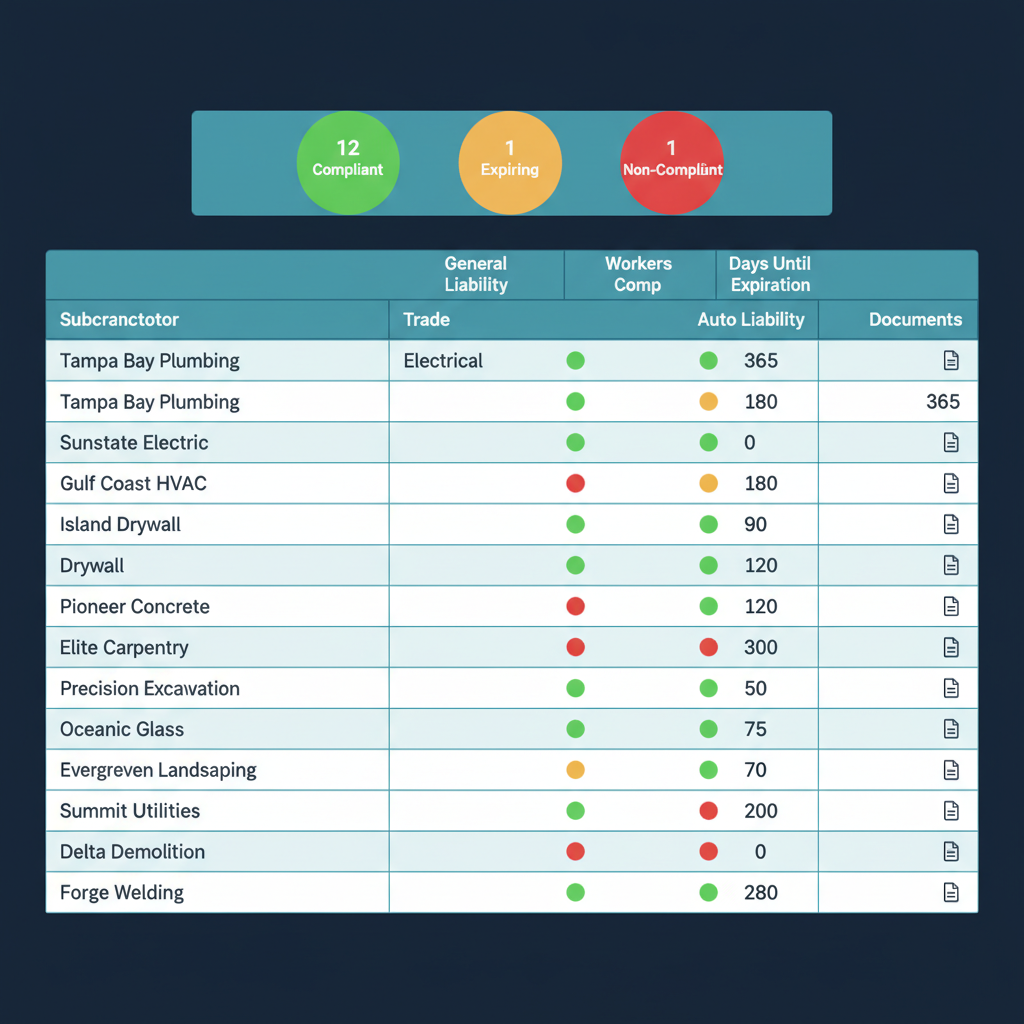
WFP tracks every subcontractor's insurance status in real time — general liability, workers' comp, auto liability, and every COI your operation requires. Color-coded compliance health shows green, yellow, and red across your entire sub roster. Non-compliant subs are automatically locked out of work order assignment. Your PMs cannot accidentally put an uninsured sub on a jobsite.
You Have 14 Subcontractors on Active Projects Right Now. How Many of Their Policies Are Current?
It is Wednesday morning. Jessica is assigning work orders for the week. She needs to send a plumbing sub to the Riverview project and an electrical sub to the Carrollwood project. She pulls up her spreadsheet — the one where she tracks sub insurance expiration dates. The plumbing sub's general liability shows a renewal date of March 15th. Today is March 19th. Did they renew? She does not know. She calls the sub's office. Voicemail. She texts. No response by noon.
Meanwhile, Marcus gets a call from the Bayshore homeowner. "There's a crew on my property and they don't have any identification or paperwork. Who are they?" Marcus calls Jessica. The crew is a sub's team — they have been working the project for two weeks. Jessica checks the spreadsheet. The sub's workers' comp certificate expired six weeks ago. Nobody caught it because the spreadsheet only gets checked when Jessica remembers to check it, and she has been managing 22 projects with 400 unread group chat messages.
That evening, Marcus calculates the exposure. If someone on that crew had been injured during those six weeks, his company would have been liable — potentially for hundreds of thousands of dollars. The sub did renew, eventually. But for 42 days, Marcus's company was exposed to unlimited liability and nobody knew.
This is what subcontractor compliance looks like when it depends on spreadsheets and memory. Here is what it looks like when the system enforces it.
The Solution
Every Sub. Every Policy. Every Expiration. Tracked, Alerted, and Enforced.
WFP does not just track sub compliance. It enforces it — with a system that prevents non-compliant subs from reaching your jobsites and documents every compliance status for audit readiness.
Green, Yellow, Red — Your Entire Sub Roster at a Glance
The sub compliance dashboard shows every subcontractor's insurance status with color-coded indicators: green (all policies current), yellow (one or more policies expiring within the alert window), red (one or more policies expired or missing). Marcus opens one screen and sees his entire sub roster's compliance health — 14 subs across 28 projects, with instant visual clarity on who is safe and who is not. No spreadsheets. No memory. No gaps.
Alerts Before Coverage Lapses — Not After
WFP sends automatic alerts when a sub's policy enters the expiration window — configurable per organization (30 days, 60 days, custom). Yellow status appears on the dashboard, and the PM and admin receive notifications. This gives time to contact the sub, request updated certificates, and verify renewal before the policy actually lapses. The alert fires based on the documented expiration date, not on someone's memory to check a spreadsheet.
Non-Compliant Subs Cannot Be Assigned to Projects. Period.
This is the enforcement layer that separates WFP from every other tool. When a sub's status turns red (expired or non-compliant), they are automatically locked out of work order assignment. Jessica cannot accidentally assign a plumber with lapsed workers' comp to the Riverview project because the system will not allow it. Compliance is not a suggestion — it is a structural constraint at the point of assignment.
General Liability, Workers' Comp, Auto — Every Certificate, Every Policy
WFP tracks every type of insurance certificate your operation requires: general liability, workers' compensation, commercial auto, umbrella/excess liability, and any custom certificate types you define. Each certificate has its own expiration date, coverage amount, carrier information, and document upload. The system handles the full picture of sub compliance — not just one policy type.
Everything You Need to Know About Every Sub — One Place
Each subcontractor has a complete profile: contact information, trade specialties, insurance documents, compliance status history, work order history, and performance notes. When Marcus needs to know which subs have worked on his projects in the last 12 months and whether their coverage was current for every assignment, the answer is in the profile — documented, timestamped, and exportable for audits.
The Difference
The Difference Between Tracking Compliance and Enforcing It
Assignment Lockout vs. Reminder Emails
Buildertrend sends a reminder when a sub's insurance is expiring. JobTread stores COI documents. SmartBid and Jones track certificate dates. None of them prevent a PM from assigning a non-compliant sub to a work order. In every competing tool, a lapsed sub can still be put on your jobsite — the system trusts the PM to check. WFP does not trust memory. It enforces compliance at the operational level.
Real-Time Health Dashboard vs. Expiration Spreadsheets
A spreadsheet of expiration dates only works if someone checks it before every work order assignment. WFP's color-coded health dashboard is always visible — green, yellow, and red status indicators across the entire sub roster update in real time as policies approach expiration or lapse. The compliance picture is not buried in a spreadsheet tab — it is the first thing you see when managing subs.
Audit-Ready Documentation vs. File Folders
When an insurance auditor, a legal team, or a municipality asks for proof of sub compliance on a specific project, WFP provides a documented compliance history per sub, per project, with timestamps. Every assignment, every status change, every certificate update is logged. This is not a folder of PDFs — it is an auditable record of compliance enforcement that demonstrates your company actively verified and enforced coverage for every sub on every project.
A Construction Company Built an Audit-Ready Operation — and Then Sold It
When every subcontractor's compliance history is documented, every work order assignment is verified against current coverage, and every policy expiration is tracked with enforced alerts, the operation becomes audit-ready by design — not by scramble. A construction company managing 60+ simultaneous projects built this level of compliance rigor into daily operations. When it came time to sell the company, due diligence passed because the compliance record was already there — documented, timestamped, and complete.
Sub compliance enforcement is not just about avoiding liability today. It is about building an operation that holds its value — whether you are scaling, hiring, or preparing for an exit.
FAQ
Common Questions About Subcontractor Compliance Tracking in WFP
Can't find your answer? Ask us in a demo
WFP's sub compliance dashboard shows every subcontractor's insurance status with color-coded indicators — green (current), yellow (expiring soon), and red (expired/non-compliant). Each sub's profile tracks general liability, workers' comp, auto liability, and any custom certificate types. The dashboard covers your entire sub roster across all active projects in one view.
When a sub's policy expires, their status automatically turns red on the compliance dashboard. They are locked out of work order assignment — PMs cannot assign them to any project until updated documentation is uploaded and verified. Auto-expiration alerts fire in advance (configurable window) to give both you and the sub time to renew before the lockout triggers.
Yes. WFP tracks workers' compensation certificates as a distinct insurance type with its own expiration date, coverage amount, carrier, and uploaded document. Workers' comp is tracked separately from general liability and auto liability so you have complete visibility into each coverage type per sub. A sub with current general liability but expired workers' comp will show yellow or red status.
WFP's sub management system allows administrators to upload and manage COI documents for each subcontractor. The uploaded documents are stored in the sub's profile with expiration dates and coverage details. The system tracks the documentation status and alerts when updates are needed.
If a subcontractor without current workers' compensation insurance is injured on your jobsite, you — the general contractor or builder — can be held liable for their medical costs, lost wages, and damages. This exposure can range from tens of thousands to hundreds of thousands of dollars or more, depending on the injury and jurisdiction. WFP's work order assignment lockout prevents this scenario by making it structurally impossible to assign a non-compliant sub to a project.
Jones and SmartBid focus on certificate collection and expiration tracking — they tell you when a sub's insurance is expiring and help you collect updated documents. WFP goes further by integrating compliance into the operational workflow. Non-compliant subs are locked out of work order assignment, not just flagged with a warning. The compliance dashboard is part of the construction operating system, not a standalone compliance tool that sits next to your PM software.
WFP is $2,500/month — one price, unlimited users, unlimited projects, full access to all features including the complete subcontractor compliance suite: health dashboard, auto-expiration alerts, work order assignment lockout, COI document management, and compliance history tracking. No add-on modules. See the full pricing breakdown at /pricing.
Explore More of the Platform
See how this feature connects to the rest of the platform.
See How WFP Keeps Every Subcontractor Compliant Across Every Project
Get a personalized demo showing the color-coded compliance dashboard, auto-expiration alerts, and work order assignment lockout — tailored to your sub roster size and compliance requirements.
Schedule a DemoUnlimited users. Unlimited projects. One price.