You're Managing 30 Projects. You Can Hold About 7 in Your Head at Once.
WFP's phase-based project management automates the construction lifecycle — from Permitting through Warranty — with one dashboard showing every active project's status, timeline, and financials. Projects advance automatically. Stalled builds surface before they become problems. Your PMs plan their day with route-mapped site visits instead of zig-zagging across the county.
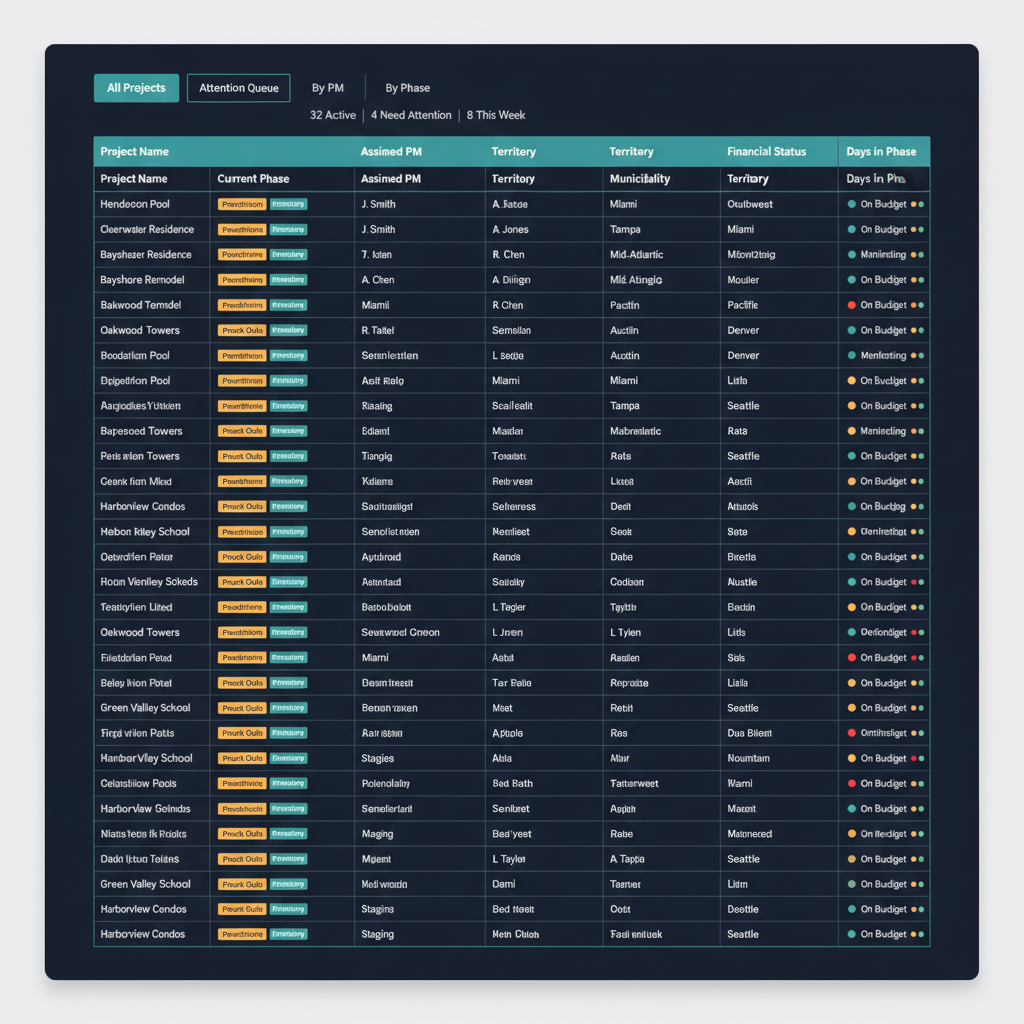
It's Tuesday Morning. Do You Know Where All Your Projects Stand?
It's 7:30 AM. Jessica has 22 active projects. She opens her laptop to get a sense of the day. One project is in the permitting phase — the application was submitted three weeks ago, and she has no idea where it stands. Another project in production hasn't had a work order completed in six days, but nobody flagged it because nobody is tracking time since last progress. A third project is in punch outs, and the homeowner called yesterday asking when the final inspection is scheduled. Jessica told them she'd call back. She still hasn't.
Marcus walks in at 8:00 for the production meeting. He asks how much money they're collecting this week. Jessica doesn't know — the financial picture lives in a different spreadsheet that the office manager maintains. The meeting takes two hours because everyone is working from different information: spreadsheets, whiteboards, group chats, the PM's memory.
By 10 AM, Jessica has visited zero job sites. She has answered twelve questions that a shared dashboard could have answered for her. Meanwhile, the permit that's been sitting unactioned for three weeks is now five days from expiring — and no one knows.
This is what construction project tracking software looks like without a system designed for it. Here is what it looks like with one.
The Solution
From First Permit to Final Warranty — Every Phase Managed, Every Project Visible
WFP doesn't just track projects. It manages them — with automation, intelligence, and construction-specific workflow design that no generic PM tool can replicate.
Projects That Move Themselves Forward
WFP organizes every project around a construction-specific lifecycle: Permitting, Staging, Production, Punch Outs, Warranty. Projects advance through phases automatically based on completion triggers — when all permitting steps are done, the project moves to Staging without anyone pushing a button. Each phase has configurable steps so the lifecycle matches how your company actually builds, not how a software company imagined phase-based project management in construction should work.
Every Active Project. One Screen. No Phone Calls.
The construction dashboard software shows phase, PM assignment, territory, municipality, payment status, permit status, and inspection schedule for every active project. Color-coded financial indicators show money coming this week (green), next week (default), or late (red). Drill into any project for the full picture — material orders, blueprints, warranty claims, communication history, and financials. Marcus never needs to call a PM to ask where things stand.
The Projects That Need You — Surfaced Automatically
The attention queue uses business-rule triggers to flag projects that are paused, stalled, or overdue. In-phase duration tracking shows exactly how long a project has been sitting in any stage — a critical capability no construction project tracking software competitor offers. Step-last-completed tracking flags builds where nothing has moved in days. Instead of reviewing 30 projects manually to find the three that need intervention, the attention queue brings the problems to you.
Pools, Remodels, Outdoor Kitchens, Roofing — Your Workflow, Your Way
WFP is not locked to one construction vertical. Fully customizable project phases, step sequences, and parameters mean the platform adapts to how your company operates — whether you build pools, custom homes, additions, HVAC systems, or all of the above. Project management for contractors works differently when a pool company and a roofing company use the same system: each defines their own lifecycle, and WFP enforces it.
Your Week, Planned — Not Guessed
The Work Order Planner gives PMs a focused weekly view — what's done, what's today, what's coming. Multiple calendar views serve different management needs: PM-level daily planning, owner-level monthly overview, and historical scheduling through the old jobs calendar. Every team member sees their week laid out with clarity instead of reconstructing it from memory each morning.
Stop Zig-Zagging. Start Routing.
PMs can see every project scheduled for work on a given day and map out their route for field visits. No more driving 90 miles to visit four sites that could have been sequenced in 40. This is not an add-on feature from a generic mapping tool — it's built directly into the Work Order Planner so your routing reflects your actual work order schedule. No competing platform offers this.
The Difference
What Spreadsheets, Buildertrend, and Generic PM Tools Are Missing
Automated Phase Transitions
Generic PM tools give you task lists. You decide when a project moves from one phase to the next by manually updating a status. In WFP, projects advance automatically when phase completion triggers fire. This is not a workflow builder you have to configure from scratch — it's a construction-native lifecycle engine with sensible defaults you can customize.
Attention Queue with Business-Rule Triggers
Buildertrend and JobTread will show you a list of projects. Neither will tell you which projects need your attention right now based on how long they've been stalled, which steps were last completed, or which business rules they're violating. WFP's attention queue replaces the mental model your PMs currently carry around — and it never forgets.
Route Mapping Built Into the Planner
No competing construction PM tool offers PM route mapping as a native feature. The closest alternative is opening Google Maps in a separate tab and manually entering addresses. WFP maps your scheduled job site visits directly from your work order calendar, sequencing them for efficiency. This feature was built because a PM actually visits sites every day — not from a product roadmap brainstorm.
Phase Duration Intelligence
How long has Project #47 been in Staging? No competitor tracks this. WFP's in-phase duration tracking gives managers instant visibility into projects aging in any stage. Combined with step-last-completed timestamps, you see not just where a project is — but whether it's moving.
Production Meetings That Used to Take Three Hours Now Take Thirty Minutes
When every project's status, phase, financials, and upcoming milestones live in one dashboard, the weekly production meeting stops being a two-hour reconstruction exercise and becomes a thirty-minute action session. A construction company managing 60+ simultaneous projects ran production meetings in under 30 minutes because every person in the room shared the same view of reality. That is the difference between a project tracking tool and an operating system.
The schedule planning, or at least plotting, allows us to be more efficient when it comes to planning the routes.
FAQ
Common Questions About Construction Project Management in WFP
Can't find your answer? Ask us in a demo
WFP's all-projects dashboard shows every active project with its current phase, assigned PM, territory, municipality, financial status, permit status, and inspection schedule. Drill into any project for the full detail — materials, blueprints, communication history, financials. No phone calls, no spreadsheets.
Phase-based project management organizes every project around the stages it actually goes through — in construction, that means Permitting, Staging, Production, Punch Outs, and Warranty. WFP automates transitions between these phases based on completion triggers, so projects advance without manual status updates. Each phase contains configurable steps that match your company's actual build process.
Yes. WFP's project types are fully configurable — pools, outdoor kitchens, custom homes, remodels, roofing, HVAC, fencing, and any other construction vertical. You define the phases, steps, and parameters for each project type. The platform adapts to how your company works.
Buildertrend requires 6–12 months of onboarding before teams see value. WFP was designed around the actual daily workflow of construction operations — one user described it as "very intuitive to just jump into and figure things out fairly quickly just by poking around." The phase-based lifecycle means your team follows a natural construction sequence, not an abstract task management framework.
Yes. The Work Order Planner includes a route mapping feature where PMs see every project with work scheduled for the day and can map out their field visit route. No separate mapping tools needed — routing is built directly into the scheduling calendar.
WFP's attention queue automatically surfaces projects that hit business-rule triggers — paused, stalled, overdue, or sitting too long in any phase. In-phase duration tracking and step-last-completed timestamps flag builds that need intervention before a manual review catches them. The system watches so your PMs don't have to carry every project in their heads.
WFP is $2,500/month — one price, unlimited users, unlimited projects, full access to all features including project management, financial dashboards, sub compliance, customer communication, and everything else. No per-seat anxiety. No modules to unlock. See the full pricing breakdown at /pricing.
Explore More of the Platform
See how this feature connects to the rest of the platform.
See How WFP Manages Every Project Across Your Entire Operation
Get a personalized demo showing the dashboard, phase-based lifecycle, attention queue, and route mapping — tailored to your specific project types and team size.
Schedule a DemoUnlimited users. Unlimited projects. One price.