Your PM Drove 90 Miles Yesterday Visiting Four Sites. Two of Them Were Five Minutes Apart.
WFP's Work Order Planner maps your scheduled job site visits into efficient routes, gives you a focused weekly view of what is done, what is today, and what is coming, and provides multiple calendar views for every management need. Your PMs stop zig-zagging across the county. Your week stops being a mental model that resets every morning.
It's 6:45 AM. Jessica Is Trying to Figure Out Where to Go First.
Jessica's alarm went off at 5:30 AM. She has six site visits today. She is sitting in her truck in the driveway at 6:45, looking at her whiteboard photo from yesterday, trying to remember which sites have work orders due today and which ones she needs to check on because something felt off last week. She opens Google Maps and types in the first address. Then the second. Then the third. She is trying to figure out the most efficient order to visit all six without backtracking. She gives up after three minutes and just starts driving to the closest one.
By 2 PM, she has visited four sites. She realizes that two of this afternoon's sites are five minutes from a site she visited at 9 AM — but she drove 20 miles south first because that is the order she thought made sense at 6:45. She will drive those 20 miles north again. By the end of the day, she has logged 94 miles across six site visits that could have been covered in 55.
Meanwhile, Marcus asks at the end of the week: "How many sites did you visit this week?" Jessica says 22. Marcus has no way to verify that or understand whether those visits were organized efficiently. He just knows his fuel costs are climbing.
This is what construction scheduling looks like when your planning tool is a whiteboard photo and Google Maps. Here is what it looks like with field intelligence.
The Solution
Your Week Planned. Your Routes Mapped. Your Field Time Productive.
WFP scheduling is not a calendar bolted onto project management. It is an intelligent planning layer where scheduling, routing, and work order execution are unified — so PMs plan better, drive less, and execute more.
Every Scheduled Site. One Map. An Efficient Route.
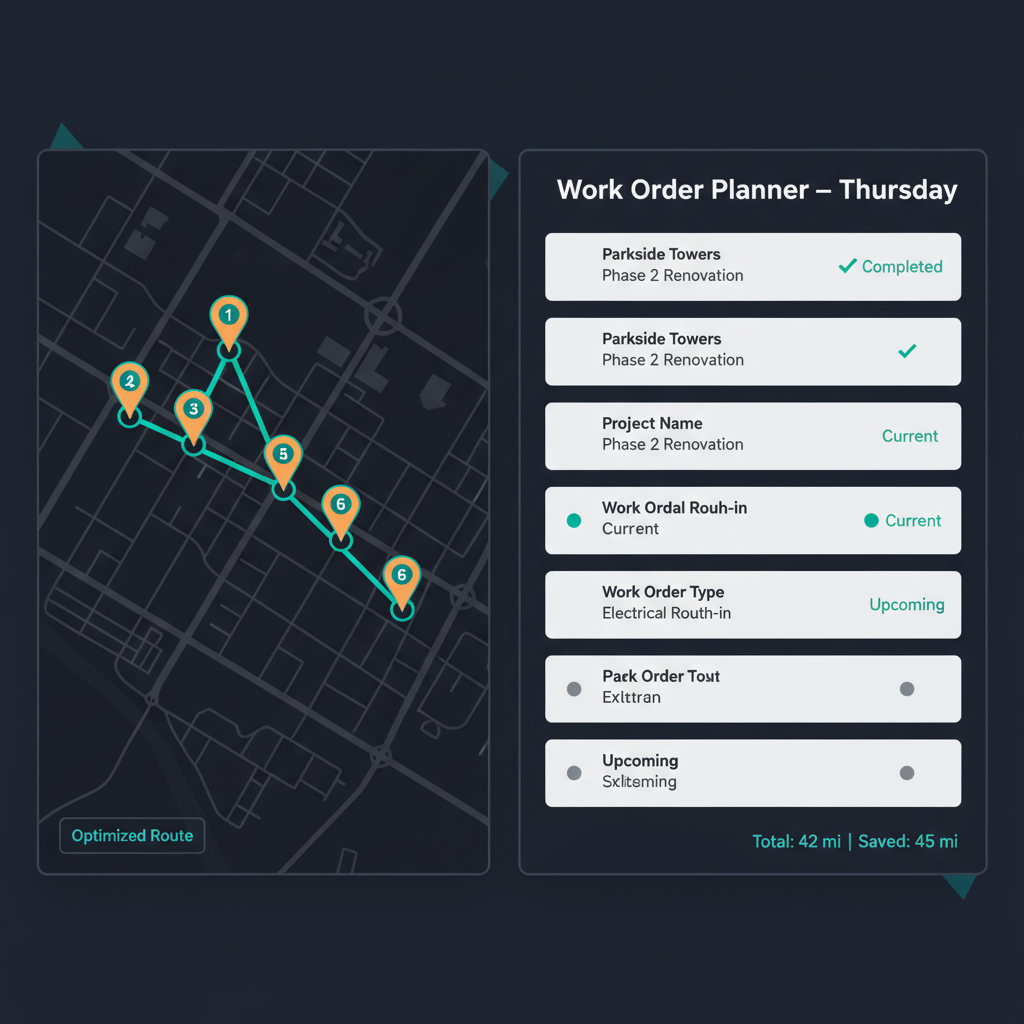
PMs see every project with work orders scheduled for the day mapped geographically with route lines connecting them in an efficient sequence. Jessica does not type addresses into Google Maps one at a time — she opens the Work Order Planner, sees her six sites mapped, and drives the route the system planned. The routing is built directly into the scheduling view, so the route reflects the actual work order schedule — not manually entered destinations.
Done. Today. Coming. Your Week in One View.
The Work Order Planner gives PMs a focused weekly view organized by work order status: what has been completed, what is scheduled for today, and what is coming in the next few days. This is not a generic calendar — it is a construction execution planner where every entry is a work order tied to a specific project, phase, and sub. Jessica opens it on Monday morning and sees her entire week laid out with clarity instead of reconstructing it from memory and whiteboard photos.
PM Daily. Owner Monthly. Historical Context. Every Perspective Covered.
Different management roles need different scheduling views. WFP provides multiple calendar views serving different needs: PM-level daily and weekly planning (what am I doing today and this week?), owner-level monthly overview (what is happening across all projects this month?), and the old jobs calendar for historical scheduling context (when was this work actually done?). Each view filters to the user's role and need without overwhelming them with irrelevant data.
Scheduling Driven by Execution, Not by Abstract Calendar Entries
In WFP, calendar entries are work orders, not abstract appointments. When Jessica sees "Tuesday: Riverview — Plumbing Rough-In" on her planner, that entry is the actual work order with the embedded blueprint, sub assignment, and status tracking. Clicking it opens the full work order. Completing it updates the project phase. The schedule is not a separate layer sitting on top of project management — it is the execution schedule driving the project forward.
See What Your Team Is Doing This Week — Without Asking
Marcus sees the weekly scheduling view across all PMs and all projects — who is visiting which sites, what work orders are scheduled, and how the week is structured. He does not need to ask Jessica or his other PMs what they are doing tomorrow. The scheduling data is visible because it comes from the work order system, not from PMs manually updating a shared calendar they often forget to maintain.
The Difference
Route Mapping for Construction PMs Does Not Exist Anywhere Else
Native Route Mapping vs. Google Maps in Another Tab
The alternative to WFP's route mapping is opening Google Maps, typing in each address manually, figuring out the best order yourself, and then switching back to your PM tool to remember what work orders are at each stop. WFP's route mapping is built into the Work Order Planner — the map shows your scheduled sites, the route connects them efficiently, and each point on the map links to the actual work order. Routing and scheduling are one workflow, not two tools in two tabs.
A Construction Execution Planner vs. a Generic Calendar
Buildertrend and JobTread have calendars. They show appointments and task due dates. WFP's Work Order Planner shows work orders organized by execution status — what is done, what is today, what is coming — tied to specific project phases. A calendar tells you when something is scheduled. The Work Order Planner tells you where your construction execution stands this week.
Scheduling Visibility That Comes from Execution Data
In most tools, the schedule is a separate input — PMs or admins manually add calendar entries. In WFP, the schedule is generated from work order assignments. When a work order is assigned to a sub for Tuesday on the Riverview project, it appears in the planner automatically. The schedule does not depend on PMs remembering to update a calendar — it reflects what is actually happening operationally.
Build Times Went from 4-6 Months to 8 Weeks — Route Efficiency Was Part of the Equation
When PMs stop zig-zagging across the county and start running efficient routes through their scheduled sites, they gain hours every week. Those hours go back into execution — following up on stalled work orders, coordinating subs, checking quality. A construction company managing 60+ simultaneous projects reduced average build times from 4-6 months to 8 weeks. Efficient field time — driven by route-mapped scheduling — was one piece of that compression.
"The schedule planning, or at least plotting, allows us to be more efficient when it comes to planning the routes."
FAQ
Common Questions About Construction Scheduling and Route Mapping in WFP
Can't find your answer? Ask us in a demo
WFP's route mapping feature shows every project with work scheduled for the day on a map. Sites are connected by an efficient route so PMs drive less and visit more. The routing is built into the Work Order Planner — PMs see the map, the route, and the associated work orders in one view. No separate mapping tool needed.
The Work Order Planner is a construction-specific weekly scheduling view showing work orders organized by status: done, today, and coming. Each entry is a work order tied to a specific project, phase, and sub — not a generic calendar event. PMs open it Monday morning and see their entire week planned with execution context, not just time blocks.
Yes. WFP provides multiple calendar views: PM-level daily and weekly planning focused on their assigned projects and work orders, owner-level monthly overview showing all projects and all PMs, and an old jobs calendar for historical scheduling reference. Each view filters to the user's role so they see what is relevant without information overload.
Route mapping pulls directly from the work order schedule. When work orders are assigned to projects for a given day, those project locations appear on the route map automatically. The route reflects the actual execution schedule — not manually entered addresses. If a work order is completed or rescheduled, the route updates accordingly.
Yes. The owner-level scheduling view shows all PMs' scheduled work orders, site visits, and weekly structure across all projects. You see who is going where, what work orders drive those visits, and how the week is organized — without asking each PM for their plan. The data comes from work order assignments, not from PMs manually updating a shared calendar.
WFP's scheduling and route mapping features are accessible from any device with a browser. PMs can view their daily route, check work orders at each stop, and update status from their phone between site visits. The route map is designed for field use — it is the tool PMs check in their truck between stops.
WFP is $2,500/month — one price, unlimited users, unlimited projects, full access to all features including the Work Order Planner, route mapping, multiple calendar views, and everything else. Route mapping is not an add-on — it is built into the scheduling system. See the full pricing breakdown at /pricing.
Explore More of the Platform
See how this feature connects to the rest of the platform.
See How WFP Maps Your Week and Your Routes — So Your PMs Build Instead of Drive
Get a personalized demo showing route mapping, the Work Order Planner, and multiple calendar views — tailored to your team size and the geography of your active projects.
Schedule a DemoUnlimited users. Unlimited projects. One price.