You Issued 18 Work Orders Last Week. Do You Know Which Ones Are Done?
WFP's work order system puts everything in one place — scope, blueprints, specs, sub-items, and completion status. Subs get a complete work order package with one click. PMs see what is assigned, what is in progress, and what is done across every active project. No more texting blueprints from your phone and hoping the sub reads it.
Jessica Sent a Blueprint to Three Subs Yesterday. One Says He Never Got It.
It is Thursday at 2 PM. Jessica has 22 active projects. She texted the plumbing sub for the Westshore project a blueprint on Tuesday — she took a photo of the engineering plan with her phone and sent it via iMessage. The sub says he never got it. Jessica scrolls back through 140 text messages to find it — it is there, sent at 7:47 AM. The sub says the image was too blurry to read. She resends it. He asks what specific fixtures to install. She texts back the spec. He asks about the rough-in sequence. She types out three paragraphs on her phone while standing in a Home Depot parking lot between site visits.
Meanwhile, Marcus asks her at 5 PM: "Where do we stand on work orders this week?" Jessica looks at her whiteboard. Six are marked as assigned. She thinks three are done but she is not sure — she needs to call the subs tomorrow to confirm. Two more were supposed to start Monday but she has not heard anything. One was never formally issued because she ran out of time and just told the sub verbally what to do at the jobsite.
The verbal work order is the one that does not get done correctly. Jessica finds out a week later when the inspection fails.
This is what work order management looks like when texts and memory are your system. Here is what it looks like with one.
The Solution
Every Work Order Created, Documented, Shared, and Tracked — Without Your PM Becoming the Relay
WFP work orders are not tasks on a checklist. They are complete execution packages — documented, shareable, trackable, and permanently recorded.
Blueprints, Specs, and Plans — Inside the Work Order, Not in a Separate Email
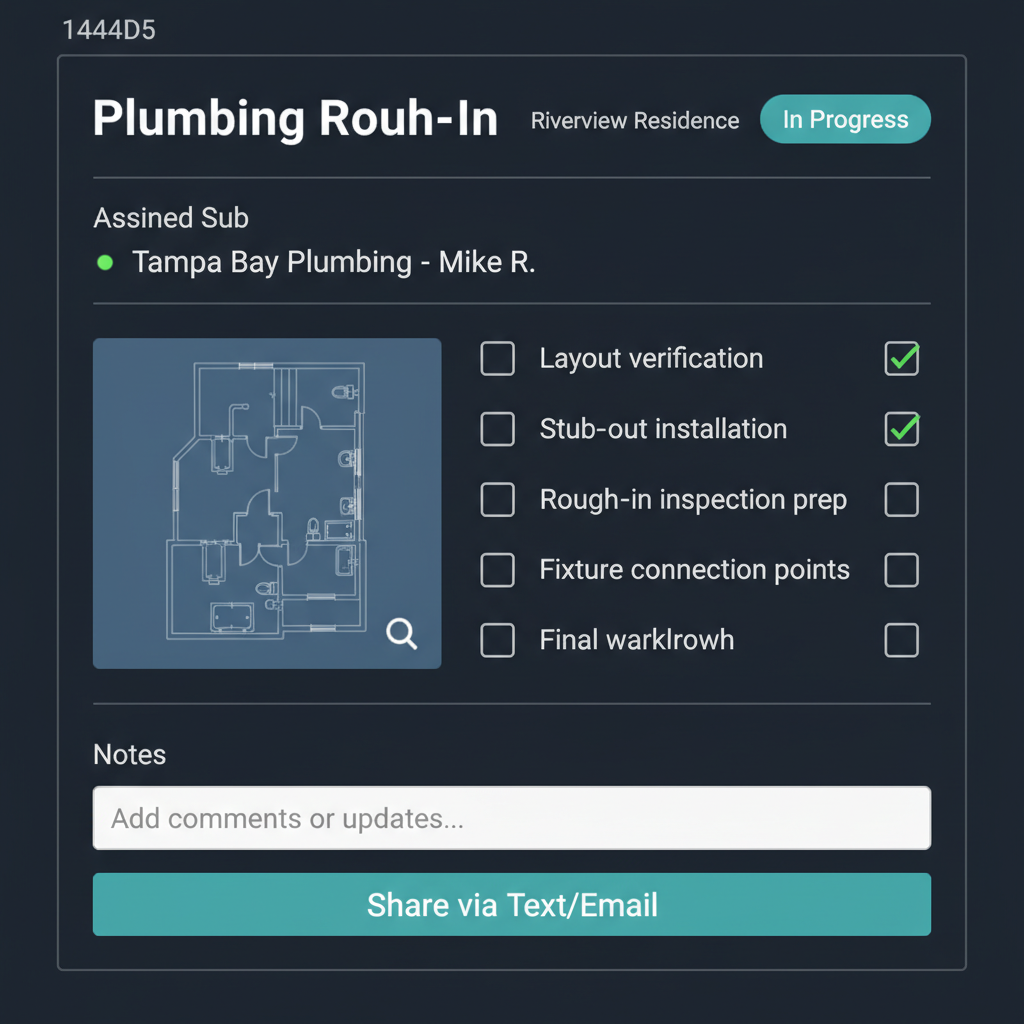
Every work order includes the scope description, embedded documents (blueprints, engineering plans, specs, sketches), notes, and sub-items in one view. The plumbing sub opens the work order and sees exactly what needs to happen, with the blueprint right there — not in a separate email attachment, not in a text message image, not in a different section of a portal. One work order, everything the sub needs to execute.
Send the Complete Work Order to Your Sub in One Click
Jessica creates the work order, attaches the documents, adds the notes, and hits share. The sub receives the complete work order package via text or email — scope, documents, sub-items, and all details. No portal login required. No app download. The sub sees it on their phone the way they receive everything else — in a message. But this time, the message has everything they need.
Complex Work Orders Stay Organized — Not Lost in a Text Thread
Large work orders break down into sub-items with individual descriptions and completion tracking. A framing work order with six sub-tasks does not get reduced to "frame the pool structure" in a text. Each sub-item — layout verification, steel placement, form setting, bracing, engineering hold-down installation, final form check — is documented and trackable. Notes per sub-item keep instructions precise where they need to be.
Assigned. In Progress. Complete. Visible Across Every Project.
Work order status tracking gives PMs and owners shared visibility into every work order across every active project. Jessica does not need to call three subs to find out if their work orders are done — the status is in the system. Marcus does not need to ask Jessica "where do we stand this week" — he sees it on his dashboard. Status updates are visible in real time, and stalled work orders are surfaced through the attention queue before they become delays.
Every Work Order Issued, Assigned, and Completed — Documented
Every work order creates a permanent record: what was assigned, to which sub, with what documents, what instructions, when it was completed, and any notes from execution. This is not a text thread that disappears — it is an operational archive. When an inspection fails and someone asks "what was the sub told to do," the answer is documented in the work order record, not reconstructed from Jessica's memory of a Tuesday morning text.
The Difference
Why Task Lists and Text Messages Are Not Work Orders
Embedded Documents vs. Linked File Libraries
In Buildertrend and JobTread, "attaching" a document to a task means linking to a file in a separate document library. The sub has to navigate to a different section — or log into a portal — to see the blueprint. In WFP, blueprints and specs are embedded directly in the work order. The sub sees the document inside the work order itself. This is the difference between a sub who reads the full scope and a sub who texts "I never got the blueprint."
One-Click Sharing vs. Portal Login Requirements
Most construction PM tools require subs to create an account and log into a portal to view their work orders. Many subs never do. WFP's one-click sharing sends the complete work order via text or email — no portal required, no app required, no account creation. The sub gets the work order in the channel they already use. Friction-free sharing means subs actually receive and read what they are assigned.
Cross-Project Work Order Visibility
Generic PM tools show work orders within a single project. Marcus manages 30 projects. He does not want to click into each one to see which work orders are complete and which are stalled. WFP's cross-project work order visibility lets owners and PMs see work order status across the entire operation — which subs have outstanding items, which projects have stalled execution, and where follow-up is needed.
60+ Active Projects. Every Work Order Tracked. Complete Execution Clarity.
When every work order is created with embedded documents, shared with one click, and tracked in real time, execution visibility does not break down at scale — it scales with the operation. A construction company managed 60+ simultaneous active projects with complete clarity across every work order because the system — not the PMs' memory — held the execution picture. That is the difference between a task list and an operating system.
At 60+ projects, a PM managing 20 of them might issue 100+ work orders per month. Without a system, those work orders exist as texts, verbal instructions, and memory. With WFP, every one is documented, tracked, and visible.
WFP's work order system lets you create, assign, and track work orders per project step with embedded documents, sub-items, and real-time completion status. Cross-project visibility shows work order status across your entire operation — not just within a single project. PMs see their assigned work orders; owners see everything.
Yes. One-click sharing sends the complete work order — scope, documents, sub-items, and notes — via text or email. Subs receive it in the messaging channel they already use. No portal login, no app download, no account creation. The sub opens the message and sees everything they need to execute the work order.
Work orders are created within specific project phases and steps. When all work orders in a phase are complete, the project can advance to the next phase — either manually or through automated phase transition triggers. This means work order completion directly drives project lifecycle progression. Stalled work orders surface in the attention queue because they are blocking phase advancement.
Yes. Blueprints, engineering plans, specs, sketches, and any other documents can be embedded directly inside the work order. The sub sees the document within the work order itself — not as a link to a separate file library. This ensures the sub has everything they need in one view without navigating to a different section or downloading from a portal.
WFP integrates subcontractor compliance checking into the work order assignment process. If a sub's insurance status is red (non-compliant), they cannot be assigned to a work order. This enforcement happens automatically at the point of assignment — PMs do not need to manually check a compliance spreadsheet before every work order. See /features/subcontractor-compliance for the full compliance system.
Stalled work orders are flagged through WFP's attention queue, which uses business-rule triggers to surface work orders that have been assigned but not progressing. PMs and owners see flagged work orders in their dashboard without needing to manually check every assignment. The system watches for stalls so your PMs focus on executing, not on checking up.
WFP is $2,500/month — one price, unlimited users, unlimited projects, full access to all features including the complete work order system: creation, embedded documents, one-click sharing, sub-items, status tracking, and cross-project visibility. No add-on fees. See the full pricing breakdown at /pricing.
Explore More of the Platform
See how this feature connects to the rest of the platform.
See How WFP Turns Work Orders Into Your Operation's Execution Engine
Get a personalized demo showing work order creation with embedded documents, one-click sub sharing, cross-project status tracking, and the Work Order Planner — tailored to your project volume and team workflow.
Schedule a DemoUnlimited users. Unlimited projects. One price.